You sit between stakeholders who speak in moods and finance colleagues who speak in SKUs. Nobody expects you to mask layers in Photoshop—but everybody expects one coherent visual by Friday. Multi-reference image generation is built for that gap: you supply several plain photographs your organization already owns, explain how they relate in everyday language, and let an AI model fuse them. You still curate references and wording; you simply skip mastering Bézier curves first. On Vheer, that workflow lives inside Multi Images to Image, where uploads replace jargon-heavy moodboards and your approvals attach to files everyone can open on a laptop screen.
The Gap Between Your Brief and One JPEG
Single-image prompts force one file or zero files to carry every constraint at once. Marketing asks for “premium energy,” legally insists on label accuracy, and the talent release only covers the existing pose plate—those tensions explode when you pretend one vague paragraph replaces structured inputs. Multi-reference workflows flip the script: each worry attaches to a concrete upload so disagreements happen against visible anchors instead of abstract taste fights.
What Vheer Multi Images to Image Offers
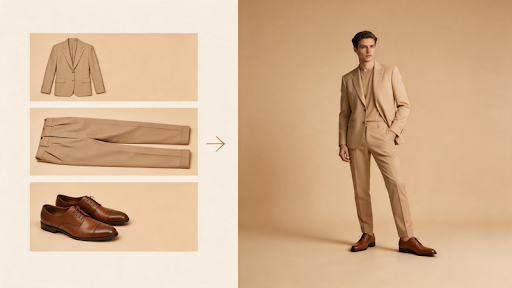
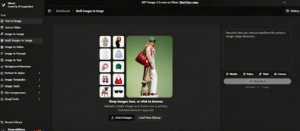
Multi Images to Image on Vheer accepts at least two reference images, blends them according to your instructions, and returns one downloadable render. You choose among listed AI models (Flux Klein, GPT Image 2, Nano Banana Pro, plus other options shown live), lock aspect ratios such as 1:1, 2:3, 9:16, or 16:9, and optionally enable Think Mode when your prompt balloons after ten Slack edits. Upload via Select Images from your laptop or Load from Library when prior runs already live inside Vheer. @ tagging—labeling `@image1`, `@image2`, etc.—lets you tell the system exactly which file supplies wardrobe versus backdrop without memorizing design jargon.
Key features
- Dual-or-multi uploads — translate messy stakeholder asks into separate files instead of one heroic paragraph.
- Model switching — trade speed for fidelity using whichever generator fits today’s deadline.
- Ratio presets — match decks, stories, or PDP grids before falling in love with the wrong crop.
- Think Mode — optional rewrite pass when non-design language needs tightening without losing compliance with nouns.
- Plain-language steering + @ tags — skip vocabulary like “blend modes”; say what belongs to which photo.
Best for: operations-led marketers, founders patching launch assets, educators building slides, and anyone who owns the outcome but not the Creative Cloud subscription.
From First Upload to Final Download
Step 1: Open the workspace
Go to the Vheer website and select the tool “Multi Image to Image” from the left navigation, and enter the editing canvas where uploads and settings live.
Step 2: Add your references
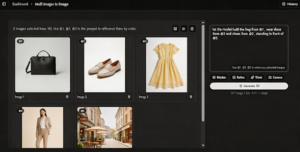
Use Select Images for anything stored locally. Lean on Load from the Library once you have older generations saved inside Vheer; newcomers typically stay with Select Images until then. Remember you need two or more images—pair your hero pose with your SKU plate, or mood lighting with packaging truth.
Step 3: Tune model and canvas
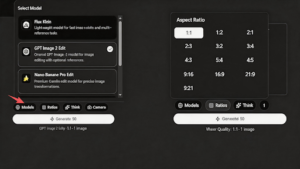
Pick an AI model from the roster (Flux Klein, GPT Image 2, Nano Banana Pro, among others). Pick an aspect ratio your channel actually publishes—square grids, vertical reels, wide banners—because retrofitting later wastes everyone’s time. Flip Think Mode on when cross-functional notes litter your prompt block.
Step 4: Explain how images cooperate
Describe roles like you would in email: “Face stays from image one, jacket fabric comes from image two.” Drop @ references when ambiguity spikes—for example: let the model @image4 hold the bag from @image1, wear dress from @image3 and shoes from @image2, standing in front of @image5.
Step 5: Generate and iterate
Press Generate, preview inside Vheer, download the high-resolution file for approvals, or rerun after swapping exactly one reference so you learn what changed.
Three Starter Recipes
Recipe A — Founder booth graphic
References: smartphone snapshot of you (@image1), official logo PNG (@image2).
Prompt:
Conference slide backdrop. Keep likeness and posture from @image1; integrate crisp logo geometry from @image2 top-right with protected clear space. Neutral gradient background, readable when projected on hotel ballroom screens.
Recipe B — PTA fundraiser flyer
References: gymnasium photo (@image1), poster artwork (@image2).
Prompt:
School newsletter hero image. Preserve gymnasium architecture from @image1 for authenticity. Fold typography-safe zones using palette cues from @image2 without distorting mascot proportions; daylight-balanced tones only.
Recipe C — Marketplace seasonal banner
References: warehouse palette (@image1), holiday ornament macro (@image2).
Prompt:
Retail banner composition. Ground authenticity using stacking lanes from @image1; borrow sparkle warmth from @image2 for ambient glow only—avoid oversized ornaments obscuring copy lanes reserved along bottom fifth.
Payoffs Without Touching Compositing Tools
Politically usable approvals. When finance sees the exact SKU plate labeled `@image2`, debates shrink from “trust me” to “compare these pixels.” Non-design leads inherit governance advantages normally gated behind agencies.
Predictable ratio hygiene. Choosing ratios inside Vheer stops last-minute vertical hacks during launch weekends—critical when you personally approve email sends while designers sleep.
Experiment pricing everyone understands. Swapping one upload costs minutes, not billable half-days. Small organizations iterate creative messaging without retainer anxiety.
Confidence borrowing studio polish. Multi-reference outputs rarely replace flagship shoots, yet they raise floor quality enough that volunteer-built campaigns stop looking accidental.
Sharper iteration budgets. When leadership pivots messaging overnight, you regenerate against the same frozen SKU plate instead of begging freelancers for another midnight composite bid every time copy shifts.
Mistakes First-Time Users Make
Throwing five unrelated inspirations into one brief. Start with two disciplined references; add a third only after the baseline behaves.
Trusting text-only prompts for trademark-heavy SKUs. Attach the actual packaging shot; describing stitching rarely survives compression.
Skipping aspect ratio until export. Lock placement geometry early even when deadlines scream otherwise—retrofitting dimensions sparks weekend crises nobody budgets.
Key Takeaways
Multi-reference image generation rewards clarity over flashy vocabulary: assign each upload a job, speak plainly, tag images when responsibilities collide, and regenerate surgically after changing one variable. You still steward brand truth—you simply delegate pixel blending to tooling built for cross-functional adults who measure outcomes in shipped campaigns instead of layer stacks.