In modern digital creation, one challenge appears again and again: turning a rough visual idea into multiple polished versions without spending hours redesigning each variation. Designers, content creators, and marketers frequently start with a single image concept, but adapting that concept to different styles, campaigns, or platforms can be time-consuming. This is where image to image ai tools are beginning to reshape creative workflows, enabling creators to transform existing visuals into new variations while preserving the original structure.
Instead of starting from a blank canvas every time, creators can now modify images intelligently—changing style, tone, or visual context while maintaining the original concept. For teams that need to produce a large volume of visual assets, this approach offers a practical balance between efficiency and creative control.
Understanding the Image-to-Image Workflow
Traditional design often follows a linear process: concept sketch, draft design, revisions, and final artwork. If a creator wants multiple versions—such as different visual styles for a campaign—they usually have to recreate large portions of the design manually.
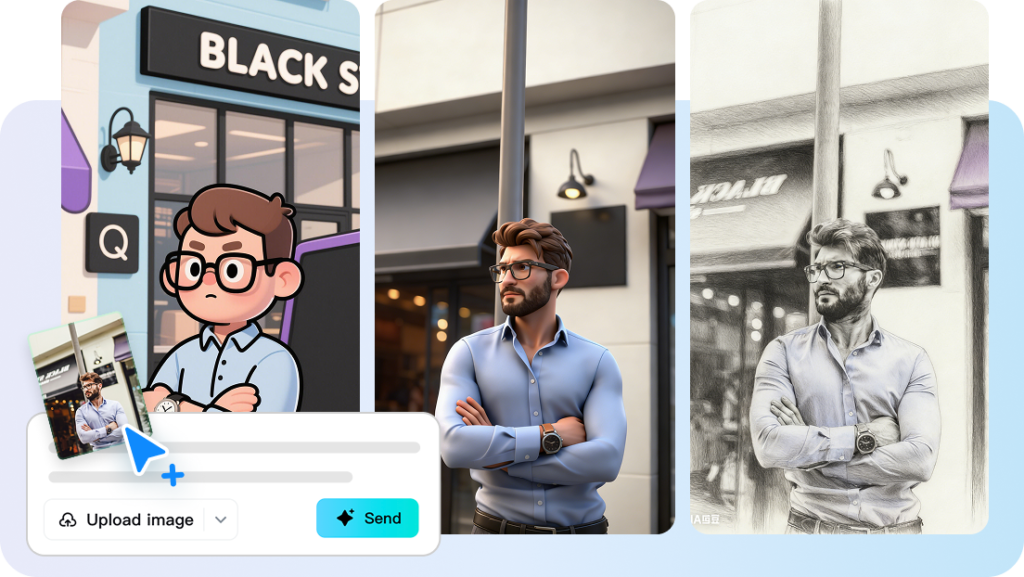
Image transformation tools based on AI introduce a different approach. Instead of rebuilding visuals from scratch, creators start with an existing reference image and guide the system to generate variations. Platforms offering image to image ai allow creators to upload a source image and apply stylistic or contextual changes while maintaining key visual elements.
For example, a simple illustration might be transformed into several versions:
- A watercolor interpretation
• A cinematic digital art style
• A minimalist poster-style design
• A vibrant social media graphic
Because the original composition remains intact, creators can experiment with new visual directions without losing the core concept.
Why Visual Iteration Matters in Modern Content
In the past, designers might create a single finalized graphic for a campaign. Today, however, content often needs to exist across multiple formats and audiences.
Consider how one visual concept may need to be adapted:
- A horizontal banner for a website
• A vertical format for social media stories
• A stylized illustration for promotional content
• A simplified graphic for presentations
Creating each variation manually can slow down production. Image transformation tools allow creators to generate multiple stylistic versions quickly, which is particularly valuable for teams managing high-volume content pipelines.
The ability to generate variations also encourages experimentation. Rather than committing to one design early in the process, creators can explore multiple creative directions before deciding which version best communicates the intended message.
From Reference Image to Creative Exploration
One of the most practical aspects of AI-driven image transformation is its ability to maintain visual consistency while exploring different styles.
A typical workflow might include the following steps:
Step 1: Choose a base image
This could be a sketch, photo, or digital illustration that represents the core concept.
Step 2: Define the desired transformation
Creators can specify stylistic changes such as lighting mood, illustration style, or color palette.
Step 3: Generate visual variations
Using tools designed for image to image transformations, creators can quickly produce several stylistic alternatives while preserving the underlying structure of the original image.
Step 4: Refine and finalize
The best variations can then be refined further using editing tools or integrated into larger design projects.
This process allows creators to move quickly from concept to visual experimentation without sacrificing creative flexibility.
Improving Creative Efficiency Without Limiting Creativity
One concern some designers initially have about AI tools is whether automation might reduce originality. In practice, many creators find that these tools actually encourage experimentation rather than limiting it.
Because visual variations can be generated quickly, creators feel more comfortable exploring unconventional styles or ideas that might otherwise require significant manual effort.
For example:
- A marketing team might test several visual themes for a campaign before launching it.
• An illustrator might experiment with new artistic styles based on an existing drawing.
• A content creator might adapt the same visual idea across multiple social media formats.
In each case, the AI tool acts as a creative assistant, generating possibilities that the creator can refine and shape further.
Practical Applications Across Different Industries
Image transformation tools are not limited to graphic designers. Many industries are beginning to adopt these workflows for visual communication.
Content creators
Social media creators often need multiple visual styles to maintain audience engagement. Image-to-image tools allow them to generate fresh visuals from existing assets.
Marketing teams
Marketing campaigns frequently require multiple creative variations. Transforming a base image into several design styles can help teams test which visuals resonate most with audiences.
Educators and trainers
Educational materials sometimes require simplified diagrams or stylized illustrations. Transforming complex visuals into clearer formats can improve learning experiences.
Product designers
Designers may explore different product visualization styles—such as photorealistic renders or conceptual illustrations—without rebuilding the design each time.
In each of these contexts, image transformation helps reduce production time while preserving creative exploration.
Tips for Using Image Transformation Tools Effectively
While AI tools simplify visual experimentation, certain practices help creators get better results.
Start with a strong reference image
The quality and clarity of the original image influence the results of the transformation. Clear compositions generally produce more consistent variations.
Experiment with multiple styles
Testing several style prompts can reveal unexpected visual directions that enhance the final design.
Use AI output as a starting point
Generated images often benefit from additional editing or refinement to achieve the desired level of polish.
Maintain a consistent visual theme
When producing multiple assets for a project, ensure that the chosen style aligns with the overall design language.
These practices help creators combine the efficiency of AI with the intentionality of traditional design thinking.
The Expanding Role of AI in Visual Creativity
As creative industries continue to adopt AI tools, workflows are becoming more collaborative between human imagination and machine assistance. Rather than replacing traditional design skills, AI is shifting where those skills are applied.
Instead of spending large amounts of time producing repetitive variations, creators can focus on higher-level decisions such as:
- concept development
• storytelling through visuals
• audience engagement strategies
• brand consistency
This shift allows creative professionals to devote more energy to ideas and communication while using technology to accelerate production tasks.
Conclusion
The ability to transform one image into many visual interpretations is changing how creators approach design projects. By using image to image ai tools, designers and content creators can experiment with style, mood, and composition without repeatedly rebuilding visuals from scratch.
More importantly, this workflow encourages creative exploration. Starting with a single concept, creators can generate multiple stylistic possibilities, refine the most compelling ones, and adapt them across different platforms.
As visual communication continues to evolve, tools built around the image to image approach will likely become an essential part of the creative process—helping individuals and teams move faster from ideas to impactful visual storytelling.