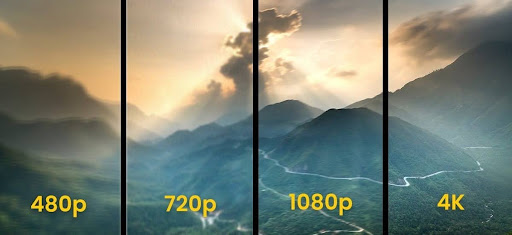
If you work with event technology, streaming, presentations, or digital video, you have probably heard the term 1080p. But what is 1080p resolution, and why does it matter when planning an event? 1080p is a video resolution of 1920 × 1080 pixels. It is commonly called Full HD, or FHD. The format provides more than two million pixels in every frame, which creates a sharper and more detailed image than 720p. That extra detail can make a major difference on large displays, presentation screens, LED walls, and professional live streams.
What Does 1080p Actually Mean?
The term 1080p contains two important pieces of information.
“1080” refers to the vertical pixel count.
“p” means progressive scan.
A 1080p image contains 1,920 pixels across and 1,080 pixels vertically. Multiply those numbers together and you get 2,073,600 pixels.
Every frame contains that much image information.
The progressive-scan format displays each frame sequentially. This creates a smooth image for normal video playback and motion.
1080p commonly uses a 16:9 aspect ratio. This is the widescreen format used by most modern televisions, monitors, projectors, and event displays.
The result is a familiar landscape image that works well for presentations, camera feeds, videos, and live broadcasts.
Why Does 1080p Look Better Than 720p?
The biggest difference is pixel count.
A 720p image measures 1280 × 720 pixels. That produces 921,600 pixels.
A 1080p image measures 1920 × 1080 pixels. That produces 2,073,600 pixels.
That means 1080p contains more than twice as many pixels as 720p.
More pixels allow the image to display more fine detail.
The difference becomes easier to notice when the content contains:
- Small text
- Product details
- Charts
- Logos
- Detailed graphics
- Close-up camera shots
- Fine lines
- Facial details
- Architectural images
- Product demonstrations
A simple presentation slide may look acceptable at either resolution.
A detailed financial chart can be different.
A small label that looks readable in a 1080p presentation may become difficult to distinguish when the same content is displayed at a lower resolution.
Higher resolution gives the production team more visual information to work with.
Is 1080p the Same as Full HD?
Yes.
1080p is commonly referred to as Full HD or FHD.
You may see several terms used to describe the same basic format:
- 1080p
- Full HD
- FHD
- 1920 × 1080
- 2.1 megapixels per frame
These terms describe the same basic resolution.
The terminology can become confusing when manufacturers use labels such as HD, Full HD, Ultra HD, and 4K.
The important numbers are the actual pixel dimensions.
1080p means 1920 × 1080 pixels.
That specification tells you much more than a general label such as “high definition.”
1080p vs. 720p
The comparison between 1080p and 720p is useful because both formats are common in video production.
Here is the basic difference:
| Feature | 720p | 1080p |
| Resolution | 1280 × 720 | 1920 × 1080 |
| Total pixels | 921,600 | 2,073,600 |
| Common name | HD | Full HD |
| Aspect ratio | 16:9 | 16:9 |
| Image detail | Lower | Higher |
| Bandwidth demand | Lower | Higher |
| Large displays | Less ideal | Better suited |
| Professional AV | Basic applications | Common choice |
Both formats can produce a good viewing experience.
The right option depends on the application.
1080p is generally the stronger choice when image detail is important.
720p can make more sense when bandwidth, device limitations, or streaming stability are the main concerns.
Why Screen Size Matters
Screen size changes how noticeable resolution differences become.
A 720p image can look perfectly acceptable on a small display.
The same image may look soft when stretched across a large screen.
Think about a conference room with a 55-inch display.
The audience is relatively close to the screen. Most presentation content uses large fonts. The difference between 720p and 1080p may not be dramatic for every slide.
Now picture a large ballroom.
The event uses a 20-foot LED wall. The presenter displays a detailed product diagram. Several hundred attendees sit at different distances from the screen.
The technical requirements are different.
1080p provides substantially more image information for large-format presentations.
Screen size is not the only factor. Viewing distance also matters.
A person sitting far from a display may notice less difference than someone sitting close to it. Event producers should consider both measurements when determining the appropriate video setup.
1080p for Corporate Presentations
Corporate presentations often contain information that requires precision.
A keynote may include a sales chart.
A product launch may show a new device.
A financial presentation may include multiple data points.
A training session may display detailed instructions.
These situations benefit from sharp visuals.
1080p helps preserve the readability of text and graphics on larger screens.
This is especially important for presentations that use:
- Graphs
- Tables
- Product specifications
- Maps
- Diagrams
- Screenshots
- Data dashboards
- Detailed photography
A presentation does not need flashy animation to benefit from higher resolution.
A simple slide with small text can be one of the strongest reasons to use 1080p.
1080p for LED Video Walls
LED walls are a popular choice for large conferences, product launches, trade shows, and corporate events.
They can serve as a stage backdrop.
They can display presentation content.
They can show live camera feeds.
They can provide branded motion graphics.
They can also combine several content sources into one visual composition.
1080p can help maintain image clarity across these applications.
However, the LED wall itself has its own technical specifications. The production team must consider the wall’s pixel pitch, physical dimensions, processor, input signal, and content configuration.
Sending a 1080p signal does not automatically guarantee a perfect LED-wall image.
The entire signal chain needs to be configured correctly.
Content should also be created with the final display in mind.
A poorly scaled logo can look blurry even when the source file has a high resolution.
1080p for Event Cameras
Cameras are another important part of the production chain.
A camera captures the image before the audience sees it.
A switcher selects the camera feed.
A processor manages the signal.
A display or streaming encoder delivers the final image.
Every part of that chain matters.
A 1080p camera can capture a detailed Full HD image. The production team can then use that feed for IMAG, recording, streaming, or presentation purposes.
Lighting matters just as much.
A poorly lit speaker can look bad even with a high-resolution camera.
The camera position matters, too.
A professional event production combines resolution, lighting, lenses, framing, switching, and image processing to create the final result.
Resolution is one piece of the system.
It is not the entire system.
Is 1080p Good for Live Streaming?
Yes.
1080p is a common choice for professional live streaming.
It provides enough detail for presentations, speaker shots, product demonstrations, and branded graphics.
There is one major consideration.
Higher resolution requires more data.
A 1080p stream generally requires more bandwidth than a 720p stream. The exact requirement depends on the codec, bitrate, frame rate, platform, and compression settings.
A production team should test the venue’s internet connection before committing to a specific streaming format.
A stable 720p stream can be better than an unreliable 1080p stream.
Buffering creates a poor viewer experience.
Dropped frames create distractions.
A stream that repeatedly disconnects can undermine an otherwise professional event.
The best resolution is the highest quality the technical infrastructure can reliably support.
1080p and Hybrid Events
Hybrid events create another layer of complexity.
People are watching in the venue.
Remote attendees are watching online.
The in-person audience may see a large LED wall.
Remote attendees may watch through a laptop, tablet, or phone.
The production team needs to satisfy both groups.
1080p can provide a strong source for the production system. The final stream can then be encoded according to the requirements of the selected platform.
A hybrid event may include:
- Multi-stage cameras
- Remote presenters
- Presentation slides
- Audience microphones
- Speaker confidence monitors
- Live graphics
- Lower thirds
- Remote audience feeds
- Recorded video
- Live streaming
The production team must manage all of these sources without sacrificing reliability.
Resolution is part of that equation.
Does 1080p Require More Storage?
Yes.
A higher-resolution video generally contains more image information.
File size also depends on compression and bitrate. Two 1080p videos can have very different file sizes.
A lightly compressed production master can be enormous.
A highly compressed streaming file can be much smaller.
This distinction matters after an event.
A production team may need to store:
- Camera recordings
- Program recordings
- Presentation files
- Graphics
- Edited highlight videos
- Speaker recordings
- Streaming archives
Storage requirements should be considered before production begins.
A multi-camera conference can generate a large amount of footage in a single day.
Planning storage in advance prevents unnecessary workflow problems during post-production.
1080p for Projectors
Projectors remain common at conferences, meetings, training sessions, and corporate presentations.
A 1080p projector can produce a sharp image for presentation slides and video.
The benefit becomes more obvious on larger screens.
Text remains easier to read.
Images contain more detail.
Video looks cleaner.
However, resolution is only one projector specification.
Brightness is critical.
Room lighting matters.
Screen size matters.
Projector placement matters.
Lens selection matters.
A bright room can make even a high-resolution image look washed out.
A professional projection setup needs the right combination of resolution and brightness.
Jumping from 1080p to 4K is not automatically the best upgrade if the room has poor lighting or the projector is not bright enough.
1080p for Virtual Meetings
1080p can also improve professional video calls.
A standard internal meeting may not require it.
A client presentation can benefit from it.
A virtual keynote can benefit from it.
A recorded executive message can benefit from it.
The difference is especially noticeable when the camera is showing a person’s face at a reasonable size.
Higher resolution can make facial details and presentation materials clearer.
Internet capacity still matters.
The platform may also limit the actual resolution delivered to viewers.
A 1080p camera does not guarantee that every participant will receive a 1080p image.
The final quality depends on the complete system.
What Comes After 1080p?
The next major step is 4K.
Standard 4K UHD resolution is 3840 × 2160 pixels.
That equals approximately 8.3 million pixels.
For comparison:
- 720p = 921,600 pixels
- 1080p = 2,073,600 pixels
- 4K UHD = 8,294,400 pixels
The jump from 1080p to 4K is significant.
4K can be valuable for large displays, detailed production work, cinematic content, and certain post-production workflows.
But 4K also requires more storage, processing power, bandwidth, and compatible equipment.
More resolution is not automatically better for every event.
A production team should choose the format that matches the audience and the technical environment.
When Should You Choose 1080p?
1080p is a strong choice when visual quality matters.
Consider 1080p for:
- Corporate conferences
- Product launches
- Trade shows
- Keynote presentations
- Large projection screens
- LED walls
- Professional live streams
- Hybrid events
- Multi-camera productions
- Recorded presentations
- Client-facing virtual events
It is particularly useful when the audience needs to see detailed information.
A large display and a detailed presentation are strong reasons to prioritize 1080p.
A professional livestream is another.
Final Thoughts
It is a 1920 × 1080 pixel video format commonly known as Full HD. It provides more than two million pixels per frame and delivers significantly more detail than 720p.
For event production, that extra detail can improve presentations, speaker images, product demonstrations, graphics, projection, LED-wall content, and live streams.
The decision should not be based on resolution alone.
Consider the screen size, viewing distance, content, camera system, internet connection, streaming platform, storage requirements, and overall production goals.
A small internal meeting may not need the additional bandwidth of 1080p.
A large corporate conference with a detailed presentation and professional livestream can benefit significantly from it.
The strongest AV strategy matches the technology to the event.
1080p is not simply a number on a specification sheet. It is a practical production choice that can directly influence how clearly an audience sees and understands your content.